
TL;DR
- Two layers do most of the work: a blocker on the device, and DNS filtering on the network.
- iPhone: an app-level blocker is the strongest option, because it can also stop itself being deleted.
- Android: DNS filtering is the most reliable self-serve method. HAJR does not make an Android app, and this guide says so rather than selling you one.
- DNS filtering is free, works on both platforms, and takes about three minutes.
- The gap in almost every setup is apps, not websites — social feeds surface the same material a web filter never sees.
- "Permanently" is a marketing word. The realistic goal is making an impulsive decision expensive.
Disclosure: HAJR publishes this guide and makes an iPhone app and a free Chrome extension. Where HAJR does not cover a platform, the guide says so and points at what does.
Start with the right question
Most guides jump straight to steps. The useful question first: are you protecting yourself, or someone else?
If you are setting this up for your own use, the thing that matters is not how thorough the block is. It is whether you can undo it in thirty seconds when you want to. That single property decides whether a setup survives contact with a bad evening, and it is the one most guides never mention.
Everything below is written for the first case — an adult putting safeguards on their own phone.
Layer 1: block on the device
iPhone
An app-level blocker is the strongest option here, because on iPhone a blocker can do something the network layer cannot: make itself hard to remove.
That matters more than filter coverage. Almost nobody defeats a blocker — they delete it, in about four seconds, during the exact moment the blocker existed for. A blocker with an off switch is a blocker you will switch off.
HAJR blocks known adult sites across supported browsers on iPhone, lets you add your own trigger sites, and runs for a period you choose in advance — up to seven days. While it is running, app uninstall protection removes the option to delete HAJR from the phone, and the filter cannot be switched off early. You can strengthen it during a session by adding sites; removing them waits for the timer.
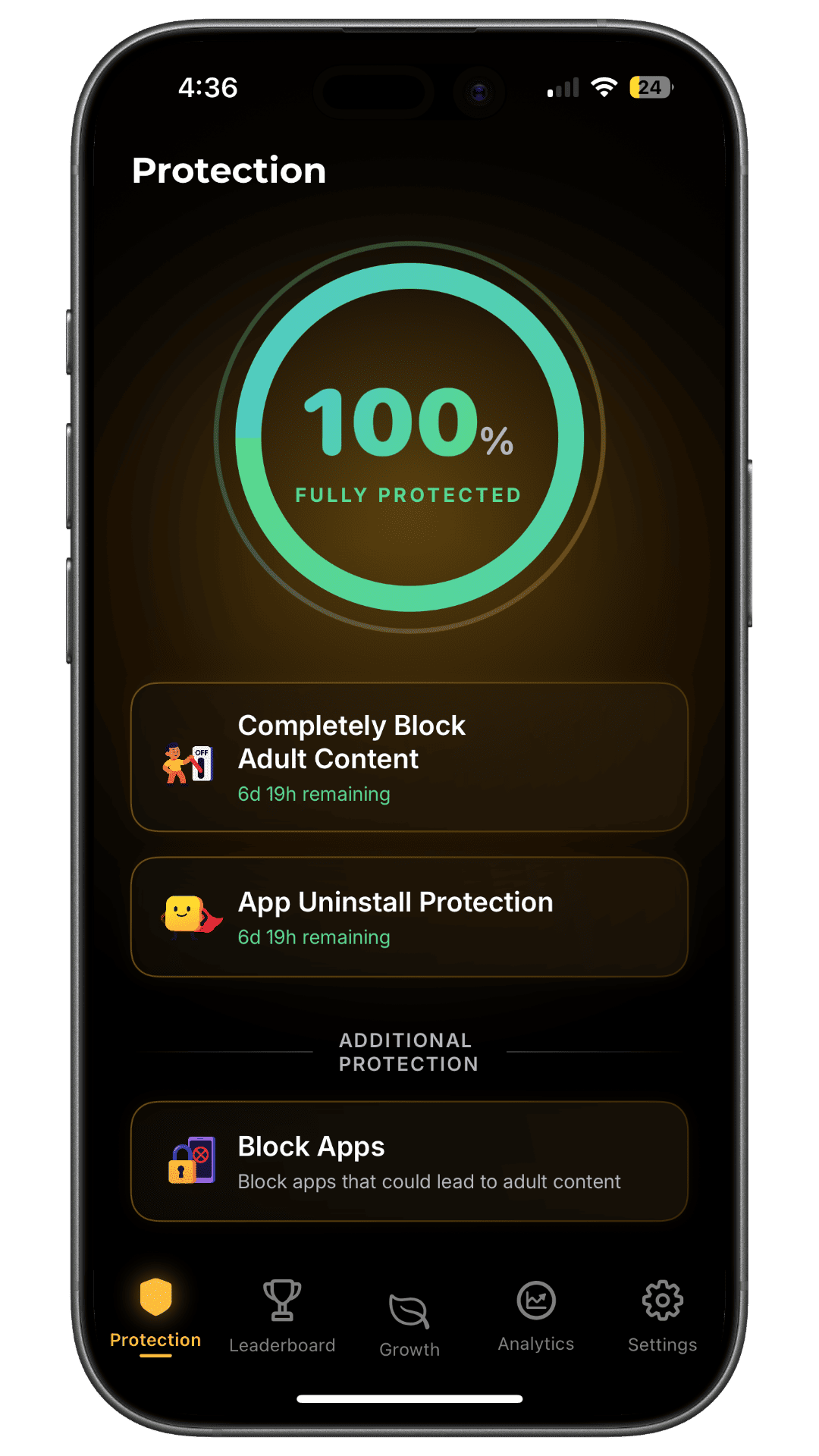
Requires iOS 17 or later. The full setup walkthrough is here, and our layered iPhone guide covers the rest of the routes.
Android
HAJR does not make an Android app. So rather than steer you toward something we sell, here is what actually works.
Android's own restrictions are designed for a parent managing a child's device. As a safeguard you are placing on yourself, they are weak — you hold whatever passcode you set, and turning them off takes seconds.
The more durable approach on Android is the network layer below, which applies to the whole device including apps, and is harder to reverse absent-mindedly. If you want app-level blocking as well, look for the same property that matters on iPhone: whether you can disable it in the moment. Most Android blockers cannot stop you uninstalling them.
Layer 2: DNS filtering — free, and works on both
This is the layer people skip, and it is the one that costs nothing and takes three minutes.
DNS is the lookup that turns a domain name into an address. Point your phone at a filtering DNS resolver and known adult domains stop resolving at all — across browsers and, importantly, inside apps.
Cloudflare's family resolver is the simplest option. Its documentation gives two variants:
1.1.1.2and1.0.0.2— blocks malware1.1.1.3and1.0.0.3— blocks malware and adult content
When a domain is blocked, Cloudflare "returns the address 0.0.0.0 instead of the real address," so the connection never completes.
Set it in your Wi-Fi settings on either platform, and on your home router to cover every device at once. Two honest limits: on mobile data your phone may fall back to the carrier's DNS unless you configure encrypted DNS at the system level, and DNS filtering works on domains — it does not inspect content inside a service, so explicit material hosted on a general-purpose platform passes through.
That is why DNS is a layer and not a solution.
Layer 3: close the routes around it
This is where most setups actually fail, and it has nothing to do with filter quality.
Apps, not just websites. Social feeds surface the same material inside apps that a web filter never sees. On iPhone, HAJR's trigger-app blocking covers the specific apps that route you there. Pick the three you actually open, not twenty you don't.
Alternate browsers. A filter configured for the browser you use does nothing about the second browser sitting on your phone. Remove the ones you do not need.
The feeds themselves. Short-form video is a cue delivery system whether or not any individual clip is pornographic. On desktop, the free HAJR Chrome extension turns off Shorts, Reels and TikTok, blocks known adult sites, and blurs explicit images locally on your own machine.
The other devices. People block their phone, feel relieved, and meet it on a laptop three days later.
What "permanently" actually means
Search results for this promise a permanent block. It is worth being precise, because the gap between the promise and reality is where people lose faith in blocking altogether.
You own the device. You hold the passwords. There is no consumer configuration on any phone that a determined owner cannot eventually undo — and any page telling you otherwise is selling something.
What a good setup does is different and genuinely useful: it makes the undo slow and deliberate instead of instant and impulsive. Thirty seconds of friction is the difference between a decision and a reflex. That is what uninstall protection buys, and it is why a timer you cannot cut short beats a passcode you can remember.
Judge a setup by that standard rather than by whether it is theoretically airtight.
Set it up in the right order
- DNS first — three minutes, free, covers both platforms and every app.
- Device blocker second — on iPhone, one that resists being deleted.
- Trigger apps third — the three you actually open.
- Extra browsers off — remove what you do not use.
- Desktop last — the laptop is the most common blind spot.
- Test once, with a site you expect to be blocked. Then stop. Repeatedly testing your own protection is usually an urge wearing a lab coat.
The part a blocker does not do
A blocker buys distance between wanting something and being able to act on it. It does not address why the urge arrived.
That matters because the evidence points at cues rather than willpower. A 2026 interdisciplinary review of problematic pornography use describes consistent findings of heightened cue reactivity and attentional prioritisation of sexual cues — attention moves toward the cue before deliberation is involved. Reducing how often you meet the cue is a more sensible target than out-arguing the response once it has started, which is exactly what these layers do.
But the conditions around it — unstructured evenings, isolation, poor sleep — are not something any filter reaches. Late nights concentrate all three, which is why we cover stopping at night on its own page. Why willpower isn't enough covers the mechanism, and our complete guide to quitting pornography turns it into a plan.
Related reading
- iPhone porn blocker that can't be disabled — the six-step iPhone setup
- How to block porn on iPhone: three practical layers
- Best porn blocker apps compared
- Why is it so hard to stop watching porn?
- You relapsed last night. What now?
Sources
- Cloudflare. 1.1.1.1 for Families setup documentation. Resolver addresses and blocking behaviour verified 2026-08-26.
- Ince C, Antons S, Ashton S, Borgogna NC, Brand M, Briken P, et al. Compulsive sexual behavior disorder (CSBD) and problematic pornography use (PPU): a comprehensive, interdisciplinary review. 2026. Source for cue reactivity and attentional prioritisation; this research is cross-sectional and cannot establish causation.
- HAJR on the App Store. Platform requirements and feature availability are shown on the listing and in the app.